群晖驱动编译篇(四)SA6400 CX314A – ConnectX-3 Pro
本驱动坑度:100,编译耗时: 5分钟以内,排坑两天(太新了,没文档)
设备信息:SA6400 DSM 7.2.1-69057 Update 5
内核信息:5.10.55+
驱动源码下载地址:https://www.mellanox.com/downloads/ofed/MLNX_EN-4.9-7.1.0.0/MLNX_EN_SRC-debian-4.9-7.1.0.0.tgz
目的:在SA6400 DSM7.2上使用CX314A网卡驱动,引导自带的驱动无法使用。
致谢:
- https://github.com/a-will/mlnx-ofa-kernel
- https://bbs.archlinux.org/viewtopic.php?id=263457
- https://xpenology.com/forum/topic/69799-sa6400-kernel-510-bulid-tcp_bbr-module-encounter-unknown-symbol-error/
- https://github.com/acooks/tn40xx-driver/pull/32/files
- https://stackoverflow.com/questions/64931555/how-to-fix-error-passing-argument-4-of-proc-create-from-incompatible-pointer
- https://github.com/RedPill-TTG/redpill-lkm
你看到致谢这么多就应该知道有多坑了。。。
坑1:老编译环境无效。因为群晖工具链的GLIB C版本太低,与交叉编译工具的GLIB C版本匹配不上,所以DSM7.2 不能在群晖上编译群晖的插件了,需要在Deabin 11(内核版本也是5.10.x)上进行交叉编译。
坑2:老代码不兼容新内核。Nvidia已经没有维护ConnectX-3 代码很久了,所以不兼容新版本内核,这也导致了ARPL RR引导知道的mlx4_en驱动无效。同时SA6400想要使用ConnectX-3网卡,需要等待内核完全加载完才行,也就是引导的模块选择中需要去除掉mlx4_core 、mlx4_en、ml4_ib
使用指引:
- 修改ARPL RR版引导,去除模块mlx4_core mlx4_en mlx4_ib
- 删除/lib/modules/下的mlx4_core.ko、mlx4_en.ko、mlx4_ib.ko
sudo rm -rf /lib/modules/mlx4_core.ko
sudo rm -rf /lib/modules/mlx4_en.ko
sudo rm -rf /lib/modules/mlx4_ib.ko- 将编译好的驱动mlx_compat.ko、mlx4_core.ko、mlx4_en.ko 复制到/lib/modules/
- 在群晖中创建计划任务,触发动作选”开机”,执行权限root,脚本内容如下:
sleep 10
/sbin/insmod /lib/modules/mlx_compat.ko
/sbin/insmod /lib/modules/mlx4_core.ko
sleep 5
/sbin/ifconfig eth2 up
/sbin/ifconfig eth3 up
其中eth2 和eth3 根据你的已有网卡和新增网卡来设置,比如我原先已经有两个网卡(eth0、eth1),我现在想要使用两个40G光口的CX314A,那就是需要额外启动eth2和eth3。
同时这里加载mlx4_core.ko会同时自动加载mlx4_en.ko。以最新源码来说mlx4_core.ko中包含了IB的驱动,但是没有IB交换机无法测试。
躺平玩法:
直接从Github下载我编译好的驱动,仅在SA6400 DSM 7.2.1-69057 Update 5 上验证。但因为是基于内核源码编译的,理论上能在内核版本为5.10.x的SA6400上使用
下载地址:DSMDriver/SA6400/ConnectX-3/build at main · adnin10086/DSMDriver (github.com)
战斗机玩法:
编译准备:
- 驱动源码:https://www.mellanox.com/downloads/ofed/MLNX_EN-4.9-7.1.0.0/MLNX_EN_SRC-debian-4.9-7.1.0.0.tgz
- 群晖内核源码:https://global.synologydownload.com/download/ToolChain/Synology%20NAS%20GPL%20Source/7.2-64570/epyc7002/linux-5.10.x.txz
- 交叉编译工具:https://global.synologydownload.com/download/ToolChain/toolchain/7.2-72746/AMD%20×86%20Linux%20Linux%205.10.55%20%28epyc7002%29/epyc7002-gcc1220_glibc236_x86_64-GPL.txz
- Debain 11机器一台
编译方法:
第一步:先解压文件:
tar -xf linux-5.10.x.txz
tar -xf epyc7002-gcc1220_glibc236_x86_64-GPL.txz
tar -xf MLNX_EN_SRC-debian-4.9-7.1.0.0.tgz
cd MLNX_EN_SRC-4.9-7.1.0.0/SOURCES/
tar -xf mlnx-en_4.9.orig.tar.gz
第二步:编译Makefile准备
在MLNX_EN_SRC-4.9-7.1.0.0/SOURCES/mlnx-en-4.9路径下执行以下命令
ln -s ofed_scripts/configure
rm -rf makefile
ln -s ofed_scripts/makefile
rm -rf Makefile
ln -s ofed_scripts/Makefile
第三步:内核编译配置初始化
在群晖源码内核中执行以下命令,博主的目录是/root/build/linux-5.10.x
cd /root/build/linux-5.10.x
apt update
apt install -y build-essential flex bison libssl-dev libelf-dev
cp synology/synoconfigs/epyc7002 .config
make oldconfig ; make modules_prepare
sed -i "s/#define UTS_RELEASE \"5.10.55\"/#define UTS_RELEASE \"5.10.55+\"/g" include/generated/utsrelease.h
第四步:源码修正
方式一:下载patch文件DSMDriver/SA6400/ConnectX-3/patch at main · adnin10086/DSMDriver (github.com)
cd /root/build/MLNX_EN_SRC-4.9-7.1.0.0/SURCES/mlnx-en-4.9
patch -p1 < 001_file_operations_to_proc_ops.patch
patch -p1 < 002_supported_coalesce_params.patch
方式二:人肉修改
修改/root/build/MLNX_EN_SRC-4.9-7.1.0.0/SURCES/mlnx-en-4.9/drivers/net/ethernet/mellanox/mlx4/crdump.c 第391行
static const struct file_operations crdump_proc_fops = {
        .owner          = THIS_MODULE,
        .open           = crdump_proc_open,
        .read           = seq_read,
        .llseek         = seq_lseek,
        .release        = seq_release,
};
修改为
static const struct proc_ops crdump_proc_fops = {
        .proc_open              = crdump_proc_open,
        .proc_read              = seq_read,
        .proc_lseek             = seq_lseek,
        .proc_release   = seq_release,
};
修改/root/build/MLNX_EN_SRC-4.9-7.1.0.0/SURCES/mlnx-en-4.9/drivers/net/ethernet/mellanox/mlx4/en_ethtool.c 第3233行
const struct ethtool_ops mlx4_en_ethtool_ops = {
        .get_drvinfo = mlx4_en_get_drvinfo,
#ifdef HAVE_ETHTOOL_xLINKSETTINGS
        .get_link_ksettings = mlx4_en_get_link_ksettings,
        .set_link_ksettings = mlx4_en_set_link_ksettings,
#endif
修改为
const struct ethtool_ops mlx4_en_ethtool_ops = {
#if LINUX_VERSION_CODE >= KERNEL_VERSION(5, 7, 0)
        .supported_coalesce_params = ETHTOOL_COALESCE_USECS |
                                     ETHTOOL_COALESCE_MAX_FRAMES |
                                     ETHTOOL_COALESCE_USE_ADAPTIVE,
#endif
        .get_drvinfo = mlx4_en_get_drvinfo,
#ifdef HAVE_ETHTOOL_xLINKSETTINGS
        .get_link_ksettings = mlx4_en_get_link_ksettings,
        .set_link_ksettings = mlx4_en_set_link_ksettings,
#endif
第五步:编译代码
下述/root/build 替换为你存放Linux源码和交叉编译工具的位置
export ARCH=x86_64
export CROSS_COMPILE=/root/build/x86_64-pc-linux-gnu/bin/x86_64-pc-linux-gnu-
./configure --with-mlx4-mod --with-mlx4_en-mod --kernel-sources=/root/build/linux-5.10.x
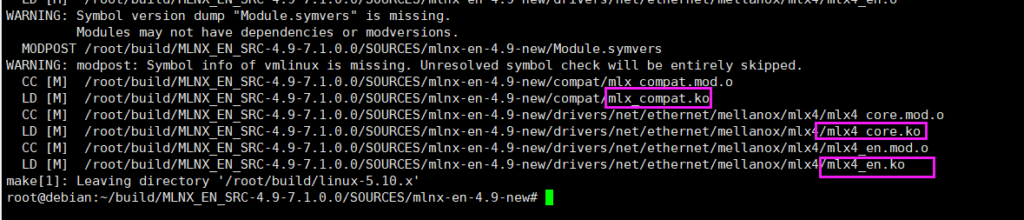
make
最后结果如下图: